
Trail Tech Voyager Pro vs Garmin Montana: Which to Buy?
This post contains affiliate links. As an Amazon Associate, we earn from qualifying purchases.
In the Trail Tech Voyager Pro vs Garmin Montana choice, the Voyager Pro is a bike-wired gauge and track follower with buddy tracking for up to 20 riders, while the Montana routes you turn by turn on the 710i and 760i. Pick the Voyager for engine data and group rides. Pick the Montana if you need routing.
That “track follower” label settles most of the trail tech voyager pro vs garmin montana decision. A track follower shows you a line someone already drew, and you ride it. A router draws the line for you after you type in a destination. Dirt Bike Test put it bluntly in its review: if routing matters to you, shop somewhere else.
What follows: the bike data only the Voyager reads, a side-by-side spec table, the custom-map workflow, the buddy-tracking range argument, the power numbers that flatten batteries, and a pick for each kind of rider.
Key Takeaways
- The Voyager Pro reads tach, engine temp and wheel speed through Trail Tech sensors, which a handheld Montana doesn’t do natively.
- Need to reach an address you’ve never visited? The Voyager has no turn-by-turn routing, so look at the Montana 710i or 760i.
- Buddy-tracking range claims run from 0.5 to 1.5 miles (Sun City Motorcycles) up to 4 to 5 miles in open terrain (Dirt Bike Test). Plan around the low figure.
- Dirt Bike Test found the Voyager can drain a lithium bike battery overnight if you leave it on.
- On the Montana, only the inReach “i” models need a subscription. Voyager map regions download free.
Does the Voyager Pro Actually Route You, or Just Follow Tracks?
You’re deep in a forest loop, the planned track dead-ends at a locked gate, and the truck is somewhere behind you. On a Voyager Pro, you scroll the map and pick a road yourself. Nothing tells you where to turn.
The Trail Tech Voyager Pro lacks turn-by-turn directions, according to Dirt Bike Test and Adventure Motorcycle, and Dirt Bike Test found it cannot auto-route to a destination. The unit follows and records GPX tracks, routes and waypoints. Firmware v1.3 added routing to a Buddy Beacon rider. The Garmin Montana 710i and 760i add City Navigator turn-by-turn for roads.
Sources split on what to call this. Upshift’s writer says the Voyager handles common GPS jobs like mapping, guiding you along routes, and recording tracks. Dirt Bike Test and Adventure Motorcycle both say there’s no turn-by-turn. They’re describing the same box from different seats.
I side with the testers on the label. When most buyers hear “GPS,” they picture typing in a destination and hearing directions. The Voyager won’t do that.
Dirt Bike Test did find a workaround in town. Its riders searched out alternate routes on the map screen in unfamiliar places, with no live traffic and no voice prompts. That works. It also means you do the thinking.
The Montana flips that. GPSTraining’s trail-riding review says the Montana 700 switches profiles between OS maps for trails and City Navigator for roads, and it sends turn-by-turn audio to a Bluetooth helmet intercom. On the 2025 lineup, Garmin limits City Navigator to the 710i and 760i.
If you’re sorting through every motorcycle navigation setup out there, this routing split decides more than any spec line. Answer it first.
70 Inches of Tach Wire: The Bike Data a Montana Can’t Read
Seventy inches. That’s the tach sensor lead in the universal Voyager Pro kit, packed next to a 48-inch power wire and an Allen wrench for the dock lock. The wiring tells you what this unit really is: a dash gauge that happens to carry maps.
Adventure Motorcycle made the point well. Small dual-sport and dirt bike dashes skip basics like a tachometer that street bikes take for granted. The Voyager fills that hole using the same sensors as other Trail Tech gauges.
Here’s what it pulls in, per the Trail Tech spec sheet that UTVSource reproduces:
- Engine temperature, read from -40 to 210 degrees C.
- RPM from the tach sensor.
- Battery voltage.
- Speed and distance, from GPS or a wheel sensor, with speed readable up to 320 km/h. Trail Tech recommends the wheel sensor for the most accurate readout.
- Run time up to 99,999 hours, which is the number you’ll actually use for oil-change and top-end intervals.
Why is the wheel sensor more accurate? GPS works out speed by comparing position fixes over time. Tree cover and canyon walls degrade those fixes. A wheel sensor counts rotations directly, so tree cover doesn’t touch it.
The snow kit goes further. It ships with 14 mm CHT, 19 mm and 25 mm water temperature sensors, plus two hose clamps. Upshift’s writer runs a Voyager on both his dirt bike and snow bike and keeps engine temp in a data field right on the map screen. That’s the setup I’d copy.
Tach readings have a known quirk. Trail Tech’s v1.1 firmware added a tach sensitivity setting specifically to troubleshoot erratic readings. If your RPM jumps around after install, start there before you rip out the wiring.
You can skip the sensors entirely. Sun City Motorcycles’ FAQ confirms the Voyager runs with no vehicle sensors attached, but it still needs a DC power connection. Honestly, though, buying a Voyager without the sensors throws away the one thing nothing else here does.
4-Inch Voyager vs 5-Inch Montana: The Spec Sheet Side by Side

The Montana 710 series, per Garmin’s Montana 710 series announcement, carries a 5-inch glove-friendly touchscreen. The Voyager runs a 4-inch, 480×272 anti-glare screen. Both units weigh the same 410 g, which surprised me.
| Spec | Trail Tech Voyager Pro | Garmin Montana 710 series |
|---|---|---|
| Screen | 4 in, 480×272, anti-glare | 5 in, glove-friendly |
| Sealing | IP67 | IPX7; MIL-STD-810 thermal, shock, vibration |
| Weight | 410 g | 410 g with battery |
| Size | 144 x 90 x 47 mm | 8.76 x 18.30 x 3.27 cm |
| Internal battery | 45 min to 2 h (disputed) | Up to 24 h GPS mode |
| Storage | 32 GB plus microSD to 64 GB | 32 GB onboard |
Plenty of adventure motorcycle GPS shoppers fixate on screen size. Here the Montana’s extra inch is real, and so is its taller body. The Voyager, at 5.6 x 3.5 inches, still fits a dirt bike dash, which matters on a skinny enduro cockpit.
Look closely at the sealing ratings. The first digit in an IP code covers dust and the second covers water. The “X” in the Montana’s IPX7 means dust wasn’t rated in that code, while the Voyager’s 6 means dust-tight. On a dusty trail ride, I’d want that 6.
Gloves are my home turf, and “touchscreen compatible” claims usually earn my side-eye. These two did better than most. Adventure Motorcycle says the Voyager’s screen works with gloves and stays bright in direct sunlight. GPSTraining says the Montana 700 works with motorcycle gloves on.
GeoPDFs, MBTiles and the 8,000-Tile CalTopo Limit
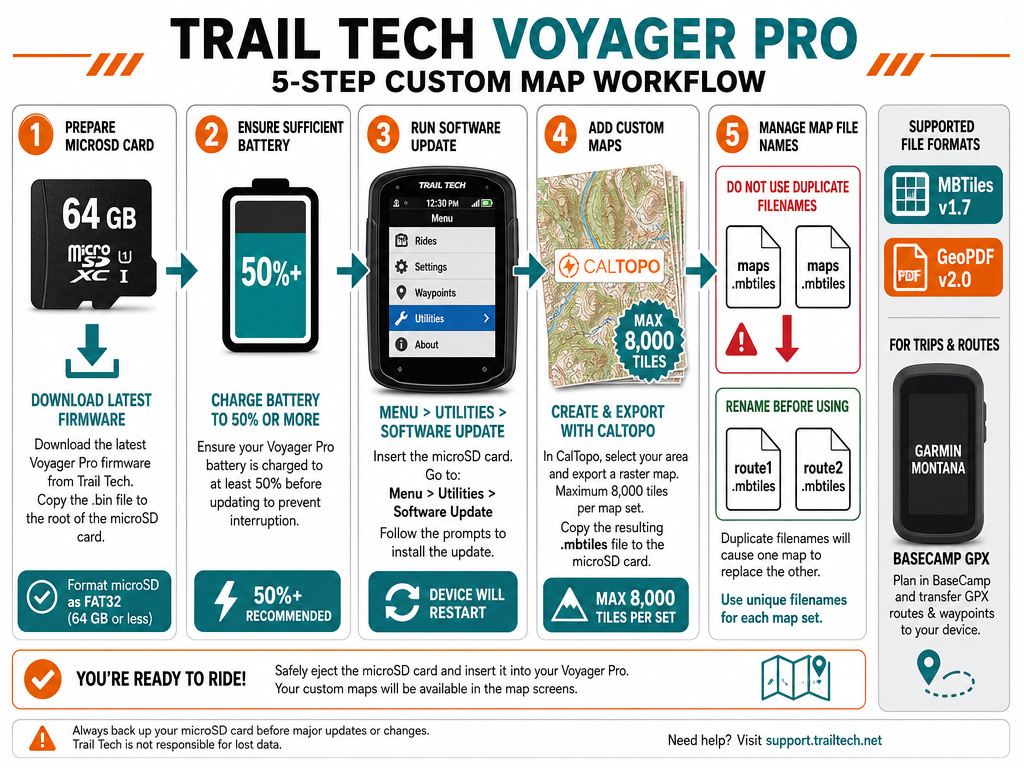
Riders shop these two on hardware. Then the stock maps let them down. Both units ship with base maps that thin out exactly where dirt riders want detail.
The Voyager’s base maps derive from OpenStreetMap. Dirt Bike Test found them accurate for contour lines and paved roads, but Forest Service and BLM roads and trails were hit and miss. Many showed up only when zoomed in tight. North American maps come preloaded, and other regions download free.
The Montana has the same problem in a different coat. GPSTraining says Garmin’s TopoActive shows little off-road detail, so UK green-lane riders end up buying OS maps or a Topo Pro card.
My take: the Voyager’s custom-map support is its best-kept feature, and it fixes the weak base map. Firmware v1.7 added MBTiles in October 2021, and v2.0 added direct GeoPDF import in March 2022, according to Trail Tech’s Voyager Pro software release notes. The February 2026 v3.0.1 build added POIs on maps, a Track-Up / Flat Offset view, and Buddy Tails improvements.
Loading a Custom Map on the Voyager Pro
Upshift lays out the workflow, and it rewards patience.
- Download the latest firmware and base map from Trail Tech’s software page onto a microSD card. Upshift recommends a 64 GB card. Skip this and older firmware won’t read MBTiles or GeoPDF files at all.
- Charge the internal battery to 50% or higher. Trail Tech’s v1.1 notes say updates require it. Start low and the update won’t run.
- On the unit, press the top left Menu button, then tap Utilities, then Software Update. This updates both the base map and firmware. Rush it and you’re riding last year’s map.
- Build your map in CalTopo or QGIS. CalTopo caps each export at 8,000 tiles, so a long route like a full BDR needs several exports.
- Rename every export by hand. CalTopo names each one maps.mbtiles. Drop two on one card without renaming and the second file overwrites the first.
Easy to miss: That identical maps.mbtiles filename. You’ll load your second CalTopo export, wonder where the first section of your route went, and find out at a trailhead with no laptop.
Getting Tracks onto a Montana
BaseCamp is Garmin’s desktop planning tool. Neither unit wins on plug-and-play file handling. The Voyager’s microSD card swap is at least simple: GPX goes on the card, the card goes in the unit.
How Far Does Buddy Tracking Actually Reach?
The two published range figures don’t even overlap. Sun City Motorcycles says it sees 0.5 to 1.5 miles, improving with line of sight. Dirt Bike Test reported 4 to 5 miles in open terrain, and says units relay each other’s positions like a mesh.
In the trail tech voyager pro vs garmin montana range argument, I can’t tell you which number your group will get. Terrain decides, and nobody has published a controlled range test. That’s an honest gap.
What isn’t disputed: Buddy Tracking uses local radio, needs no cell signal, and handles up to 20 riders per group. Sun City Motorcycles’ FAQ adds one detail buyers miss. The external antenna is required for buddy tracking to work properly.
Dirt Bike Test’s group said it changed how they rode. Less stopping, less waiting at junctions for the slow guy. Their catch was cost: everyone needs a Voyager, and talking a buddy into buying one tests the friendship. Firmware v1.2 also made the Voyager compatible with Polaris MY20 Ride Command Group Ride.
I’d plan every group ride around the 0.5-mile figure and treat anything longer as a bonus. Spread your group wider than that in a canyon and you’re back to waiting at junctions.
The Montana does a different job. The 710i and 760i carry inReach two-way messaging and SOS over the Iridium satellite network, with a subscription. That reaches far past any rider-to-rider radio. It just won’t put your buddies’ icons on the map the way the Voyager does.
0.8 Amps, 45 Minutes and a Flat Battery by Morning
Three numbers run your Voyager power plan: 0.8 A typical draw with buddy tracking on, an internal battery that lasts somewhere under two hours, and a charging window of 0 to 55 degrees C. Electronics are where my own testing runs thinnest, so on power I’m leaning on meter readings from Dirt Bike Test’s Voyager Pro review instead of my gut.
Before you start: (1) Never connect the Voyager to AC power. Sun City’s FAQ says it damages the unit and voids the warranty. (2) Dirt Bike Test found the unit drains a lithium bike battery overnight if left on, especially with buddy tracking running. Hold the upper left button to shut it down before you walk away. (3) The internal battery only charges between 0 and 55 degrees C, and 0 degrees C is also the operating floor. Snow riders shouldn’t count on it charging in the cold.
Sources disagree on several Voyager power figures, so here they are side by side:
| Figure | Source | What it says |
|---|---|---|
| Internal battery life | Sun City Motorcycles | About 45 minutes |
| Internal battery life | UTVSource spec copy | About 1 h typical; 45 min at full backlight |
| Internal battery life | Dirt Bike Test | 45 minutes to 2 hours |
| External power input | Sun City Motorcycles | 12 V DC required |
| External power input | UTVSource spec copy | 8 to 16 V DC |
| Measured draw | Dirt Bike Test | 2.0 A peak, 0.8 A typical; regulated 12 V |
Why does this matter more on the Voyager? Its 3100 mAh internal battery is a bridge, not a fuel tank. It covers a reboot or a short stop. The bike’s electrical system does the real work, so a bad connection means a dead screen within the hour.
Where this goes sideways: Parking at camp with the unit still on and buddy tracking running. That steady draw keeps working all night, and Dirt Bike Test found it can leave a lithium battery too flat to start the bike by morning.
The Montana runs the other way around. Garmin quotes up to 24 hours in GPS mode and up to 440 hours in Expedition mode for the whole 710 series, charging over USB-C. The older 700i and 750i spec sheet lists 18 hours and 330 hours. Only the original Montana 700 takes an optional AA battery pack; the 700i and 750i use the rechargeable pack only.
One Garmin forum owner watched his switched-off 700i drop from 100% to 94% over about two weeks. Garmin support called that normal. GPSTraining rates the 710-series battery to hold up to a year powered off.
Where Each One Breaks: Mud-Sticky Docks and Dying Cradles
One Montana 700 owner put a meter on his motorcycle cradle. The bike battery read 11.9 volts. Pin 3 on the cradle read only 4.3 volts, so the unit would not charge.
That’s a forum report, not a lab test. It still matches a pattern. Montana 700i and 750i owners on Garmin’s forums describe random shutdowns and freezes over about three years, including RMA replacements that failed the same way. Garmin staff said they were working to understand the cause.
Garmin says mount-related shutdowns are believed resolved and offers a vibration-damper kit. Some owners report faulty cradles that already had the updated dampers, and call it a design problem. I can’t settle that one. Neither can Garmin’s own forum, apparently.
A GPS mount works like a mortise-and-tenon joint. The board rarely fails. The joint does, and on both of these units the joint is the dock.
The Voyager has its own joint trouble. Dirt Bike Test found mud makes the dock slider sticky, so a unit that should click home can work loose. Their dock also locked itself once and needed the Allen wrench to release it.
Here’s how the failure points stack up:
- Montana powered cradle: vibration wears the contacts. Carry a multimeter and check voltage at the cradle, not just the battery.
- Montana suction mount: Tracks4Africa calls its USB connector a weak point and recommends the hard-wired ATV/motorbike mount for vehicles. Its 750i survived two weeks of corrugated roads in Namibia.
- Voyager dock slider: clean the mud out after every wet ride.
- Voyager dock lock. Keep the Allen wrench on the bike.
Ruggedness wording differs too. Garmin’s 2025 release lists MIL-STD-810 for thermal, shock and vibration, with water covered separately by IPX7. Older 700-series listings claim MIL-STD-810 covers water as well. Neither unit had a recall turn up in the research.
The part nobody mentions: The dock on either unit fails long before the screen does. Ride it before you trust it, and inspect the contacts after the first rough day, not after the screen goes black.
Which Montana? The Letter After the Number Picks Your Features
The letter after the model number is what you’re paying for. On both Montana generations, an “i” means inReach satellite messaging, and that brings a subscription with it.
Montana 710, 710i and 760i (2025)
The plain 710 has no inReach and no City Navigator turn-by-turn. It does offer GPS, GPS+GLONASS or GPS+Galileo. The 710i and 760i add inReach and City Navigator but drop to GPS or GPS+Galileo, because GPSTraining says the Iridium antenna takes the place of GLONASS.
The 760i adds an 8 MP geotagging camera. A Bike24 listing calls the 760i multi-frequency. GPSTraining says the 710 series isn’t multiband, and Garmin’s release only claims multi-GNSS with GPS and Galileo. I’d trust Garmin and GPSTraining here.
Skip the 760i unless you’ll actually use the camera. The 710i covers routing and SOS for a dual-sport bike.
Montana 700, 700i and 750i (2020)
The 700 weighs 397 g and is the only one that takes the AA pack. The 700i and 750i weigh 410 g, store 16 GB, and run 18 hours in GPS mode. These are the units tied to the shutdown threads above, so buy used with your eyes open.
Older Units, Alternatives and Your Phone
Forum threads also bring up the older Montana 600-series units, the Garmin Zumo XT2, the Garmin Tread 2, and phone apps like Gaia GPS. I don’t have verified test data on any of those, so I won’t rank them. A broader roundup of motorcycle GPS units is the place to start if neither of these two fits.
Dirt Bike Test noted that cell phones seem to be the new GPS for most riders. If you’re debating phone versus dedicated motorcycle GPS for trail riding, remember the Voyager’s buddy tracking needs no cell signal at all.
On cost, the sources disagree. Trail Tech’s own list price for the Voyager Pro kit sits above the figure Dirt Bike Test quoted, and Trail Tech now also sells pricier Voyager Pro 4 kits. Voyager map regions download free. Montana ongoing costs come down to the inReach plan and any extra map cards.
Which One Should You Buy? Picks by Rider Type
Match the unit to the job you ride most. Plenty of riders shopping for a dual-sport GPS want one box that does everything. Neither of these does.
- Group dirt bike or trail rider: Voyager Pro. Buddy tracking and engine data win, and you’re following known tracks anyway.
- Snow biker: Voyager Pro, with engine temp on the map screen like Upshift’s writer runs it. Remember the 0 degrees C operating floor.
- Adventure tourer mixing pavement and dirt: Montana 710i. City Navigator routing to fuel and lodging beats any engine readout on a long trip.
- Solo backcountry rider with no cell coverage. Montana 710i, for inReach SOS.
- Roadbook rally racer: GPSTraining says the Montana can’t display roadbook information, and none of my sources show the Voyager doing it either. Look elsewhere.
Head to head, the Voyager Pro wins on dirt bikes ridden in groups, and the Montana wins on anything that touches unfamiliar pavement. Some forum riders run both: the Voyager on the dash for bike data and buddies, a Montana for routing. Expensive. Also the only setup that covers everything.
My default pick for a dirt-focused rider is the Trail Tech Voyager Pro. The exception is anyone who needs to type in a destination, and that rider should buy the Garmin Montana 710i.
Frequently Asked Questions
Which is better, the Trail Tech Voyager Pro or the Garmin Zumo XT2?
I don’t have verified test data on the Zumo XT2, so I can’t give you a fair head-to-head. The deciding question is still routing. Dirt Bike Test confirms the Voyager won’t auto-route, so if you need turn-by-turn, a routing-capable Garmin wins that job.
Is the Garmin Montana worth it?
For riders who need routing plus off-grid SOS, the 710i earns its place. Garmin rates the 710 series at up to 24 hours in GPS mode, which beats the Voyager’s internal battery by a mile. Riders who mostly follow GPX tracks with a group get more from the Voyager.
Which Garmin Montana is the best?
For motorcycle use, the 710i hits the sweet spot: City Navigator turn-by-turn and inReach SOS. The plain 710 lacks both. The 760i only adds an 8 MP camera.
Does the Garmin Montana 700 require a subscription?
The subscription is tied to inReach messaging and SOS, which live on the “i” models. Garmin’s 2025 release says inReach on the 710i and 760i requires a subscription, and the 2020 lineup uses the same “i” naming. The device itself runs without one.
Does the Voyager Pro work in freezing temperatures?
The spec sheet lists an operating range of 0 to 60 degrees C, so 0 degrees C is the floor. The internal battery also charges only between 0 and 55 degrees C. Sub-freezing riding sits outside the listed range.
Before You Go
Before you order either unit, look back at your last month of riding. Count the times you needed to reach somewhere you’d never been. If that count is zero and you ride with friends, the Voyager Pro is your unit, and the routing gap won’t bother you.
If you buy the Voyager, do one thing in the first week: wire it so you can’t leave it running overnight, then check the dock slider after your first muddy ride. Those two habits head off the failures testers actually hit.
One limit on all of this. Cold-weather riding and long multi-climate tours are where my own experience runs thin, and the Voyager’s 0 degrees C floor lands right in that zone. If you ride snow or high passes in shoulder season, lean harder on the spec sheet than on my picks.
Bottom line: buy the Trail Tech Voyager Pro if you ride dirt in a group and want engine data on your dash; buy the Garmin Montana 710i if you ride unfamiliar roads, ride solo off-grid, or need a GPS that tells you where to turn.
