
Apple CarPlay on Motorcycles Explained
This post contains affiliate links. As an Amazon Associate, we earn from qualifying purchases.
Apple CarPlay on motorcycles mirrors your iPhone’s navigation, music, and calls to the bike’s display. It needs three things: a compatible motorcycle (2020+ Indian, 2018+ Honda Gold Wing, or select Can-Am/HD models), a wired USB connection, and a Bluetooth headset for audio and Siri. Aftermarket displays like the Carpuride W702BS PRO add CarPlay to any bike.
That headset rule is the part that trips people up. Indian, Can-Am, and Honda all say a Bluetooth headset is mandatory for CarPlay to function at all — not just for calls, but for the system to even launch. A missing headset grays out the CarPlay icon. This isn’t a suggestion; it’s a lockout. This is a key point in any guide to apple carplay on motorcycles explained.
What follows is a breakdown of which bikes have it, the exact gear you need, and how to set it up without frying your phone’s camera, which is the core of the apple carplay on motorcycles explained. We’ll also cover the aftermarket path for bikes BMW left behind.
Key Takeaways
- Factory CarPlay is limited to 2020+ Indian models with the 7-inch RIDE COMMAND display, 2018+ Honda Gold Wings/Africa Twins, and select Harley-Davidson touring and Can-Am Spyder models.
- You must have a Bluetooth headset paired to the bike before CarPlay will work. The system checks for it and fails without one.
- Use a short, high-quality Apple-certified USB cable. Can-Am specifies a maximum length of 1500 mm. Generic or long cables cause the most common connection drops.
- Aftermarket displays like Carpuride are the only way to add CarPlay to bikes without it, including all BMW motorcycles.
- Mount your phone with a vibration-dampening mount if using an aftermarket display. Handlebar vibration kills iPhone cameras.
Which Motorcycles Have Factory Apple CarPlay?
Honda put it on the map. The 2018 Gold Wing was the first motorcycle with factory Apple CarPlay, turning its dashboard into a familiar iPhone screen. Every Gold Wing from that year forward has it. The Africa Twin adventure bike got it later, which is a serious advantage for navigation on backcountry roads.
The official help article for apple carplay on motorcycles explained states it works on 2020 and newer Chieftain, Pursuit, Roadmaster, and Challenger models equipped with the 7-inch display, provided they have the July 2025 RIDE COMMAND software update or newer. If your Indian has the smaller 4-inch or 4.3-inch screen, or is from before 2020, you’re out of luck. Models without the built-in navigation package need a dealer-installed accessory (part number 2884468) to enable it.
Harley-Davidson brought CarPlay to its touring line through the new Skyline operating system.
Can-Am supports it on the 2024 Spyder F3 and RT series with the 10.25-inch display. Their FAQ is blunt: you need an iPhone connected via USB and a headset connected via Bluetooth. Miss one, and the CarPlay applet stays grayed out.
Then there’s BMW. Despite their cars having CarPlay for years, BMW Motorrad does not offer Apple CarPlay on any motorcycle. Not the R 1250 GS, not the S 1000 XR. That gap created the whole aftermarket display industry.
The part nobody mentions: If you buy a used 2020 Indian Challenger, you must check if the previous owner activated the navigation package. No nav, no CarPlay — even if the 7-inch screen looks ready.
The Core Requirements: Phone, Headset, and Connection
Every system needs the same three components, but the specs disagree. You can’t just plug in and go.
First, your iPhone. The minimum iOS version depends on the brand, as sources disagree: Indian says iOS 12 or above, Honda’s manual says iOS 10 or later, and Can-Am demands iOS 14+ and says iOS 13 or lower will not work. According to their respective sources, an iPhone 5s or later will work on an Indian, while an iPhone 5 or newer will work on a Honda. Can-Am does not specify a minimum iPhone model, only iOS 14+.
Second, the Bluetooth headset. This is required for factory systems. The official word from all three major brands is that a Bluetooth headset connection is required to use Apple CarPlay. It’s not just for audio; the bike looks for that paired headset before it makes the CarPlay icon available. Can-Am specifies Bluetooth 5.0 and up for stability and warns that headsets with Bluetooth 3.x or 4.x may cause call drops and Siri issues.
Third, the physical link. It’s a wired USB connection for every factory system. Wireless CarPlay is not an option from Honda, Indian, or Can-Am. You must plug in. Can-Am adds a critical cable spec: use an Apple-certified USB cable with a maximum length of 1500 mm (about 5 feet). Shorter is better. Can-Am recommends using an Apple-certified USB cable for a stable connection.
| Component | Indian Motorcycle | Can-Am | Honda |
|---|---|---|---|
| Minimum iPhone | iPhone 5s or later | Not specified | iPhone 5 or newer |
| Minimum iOS | iOS 12 or above | iOS 14+ | iOS 10 or later |
| Headset Required? | Yes, Bluetooth-paired | Yes, Bluetooth 5.0+ recommended | Yes, headset connection necessary |
| Connection Type | Wired USB | Wired USB | Wired USB |
| Key Caveat | Needs active navigation package | Applet grays out if headset missing | Touchscreen blocked while moving |
A Bluetooth-paired headset is required to use Apple CarPlay. This isn’t a recommendation for hands-free calls. The motorcycle’s infotainment system performs a handshake with the headset before it will even launch the CarPlay interface. No headset pairing, no CarPlay.
Factory vs. Aftermarket: The Two Paths
Your bike either has CarPlay built-in or it doesn’t. There’s no official upgrade from Honda or BMW to add it later. So you pick a path.
The factory path is cleaner. You get a display that’s waterproof, vibration-proof, and integrated with your bike’s controls. The downside is you’re locked into that manufacturer’s compatibility list and update schedule.
The aftermarket path is for everyone else. This means adding a separate display like a Carpuride W702BS PRO or similar unit. These are standalone screens you mount to your handlebars, powered by your bike’s battery. They connect to your phone wirelessly via Bluetooth or Wi-Fi, bypassing the OEM’s need for a wired USB link and sometimes even the headset requirement.
Why would you go aftermarket?
Three reasons. First, your bike isn’t on the factory list (this is all BMW owners). Second, you want wireless CarPlay to avoid plugging in your phone. Third, you want to keep using your preferred Bluetooth headset paired directly to your phone for better audio, while the CarPlay unit just handles the map display.
The trade-off is clutter. You now have a second screen, its power wires, and a separate mount. You also lose integration with your bike’s native controls.
Step-by-Step Setup for a Factory System

The process is similar across brands. Get the sequence wrong, and you’ll be troubleshooting.
- Update Everything. Before you connect a cable, check for updates. Your motorcycle’s infotainment software needs to be current. Your iPhone also needs the latest iOS. Old software is a common cause of “No Connection” errors.
- Pair Your Headset First. Go into your bike’s Bluetooth menu and pair your helmet’s Bluetooth headset. Make sure the headset is on and in pairing mode. Confirm the connection is active in the bike’s device list. This step must come first.
- Connect with an Apple-certified USB cable. Plug your Apple-certified USB cable into the bike’s port. Then plug it into your iPhone. Use a short Apple-certified USB cable.
- Allow CarPlay on Your Phone. The first time you connect, your iPhone will ask if you want to allow CarPlay on this vehicle. Tap “Allow.” You can also set it to connect automatically in the future via Settings > General > CarPlay on your iPhone.
- Navigate Using the Display. Once launched, your bike’s screen will show the CarPlay home screen. Use the bike’s hard buttons (if equipped) or the touchscreen (if the bike is stopped) to control it. On a Honda, the touchscreen locks out when the bike is moving—you must use voice commands or handlebar controls.
What happens if you skip a step?
If you connect the phone before pairing the headset, the CarPlay icon will often remain grayed out or unresponsive. If you use a cheap cable, the connection will drop repeatedly over bumps, forcing you to unplug and replug. If your bike’s software is out of date, nothing happens at all.
The Aftermarket Installation Reality
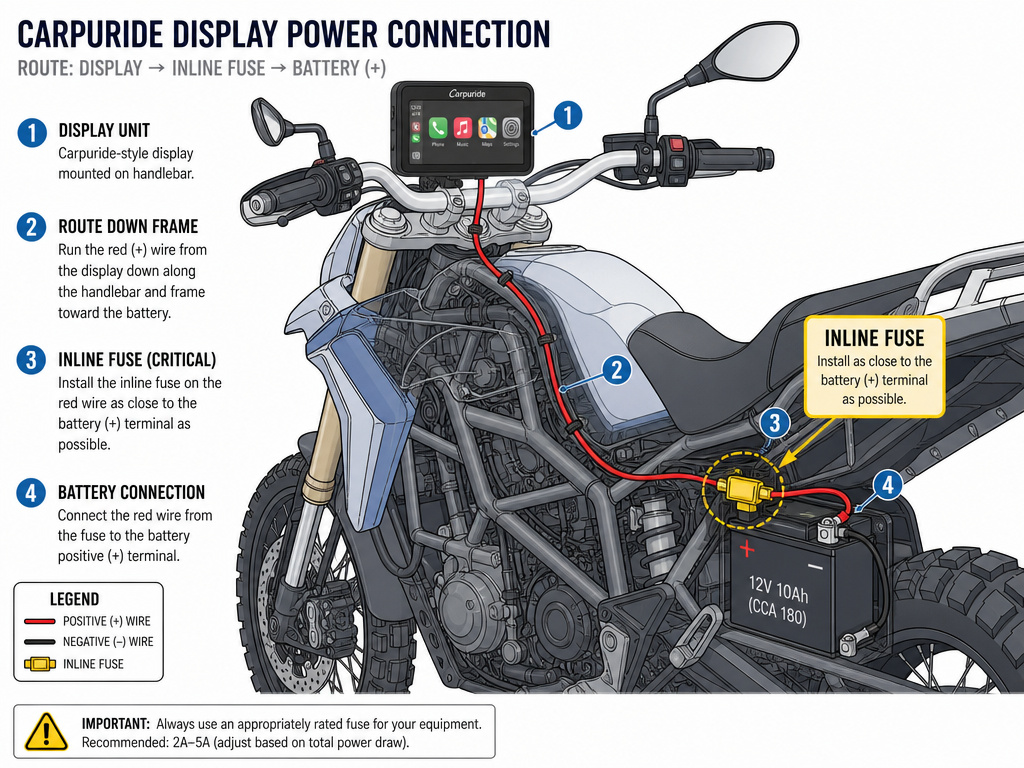
Installing a unit like a Carpuride isn’t just plug-and-play. It’s a small electronics project.
You need to route power, usually from the battery or a fused accessory circuit, to the display’s power adapter. This means running wires under the tank or along the frame. You need a secure, vibration-resistant mount—a standard RAM ball mount works. Most importantly, you need to protect your phone.
If you’re using your phone as the brains for an aftermarket display, you must use a vibration-dampening phone mount.
The setup process is different, too. You pair the display to your phone via Bluetooth (sometimes listed as “i-Play” or similar), not USB. Some adapters, like the Maedhawk wireless dongle shown in YouTube tutorials, trick the system into thinking a headset is present, which contradicts every OEM manual but can work.
Where this goes sideways: Running power directly from the battery terminals without an inline fuse. A short in the wire can drain the battery overnight or, in a worst-case scenario, start an electrical fire. Always use a fused link.
Troubleshooting: When CarPlay Won’t Connect
The system is fussy. Here are the fixes, in order.
- The CarPlay icon is grayed out. This means the bike doesn’t see a required device. Check one: Is your Bluetooth headset turned on, paired to the bike, and showing as connected in the bike’s menu? Check two: Is your iPhone connected via a known-good USB cable? Reseat both connections.
- Connection drops repeatedly over bumps. Your USB cable is failing. Swap it for a shorter, Apple-certified cable. The internal wiring in cheap cables fatigue and break with vibration.
- “No Navigation” message appears (Indian). Your bike’s navigation package is not active. On Indian models, CarPlay requires an active navigation subscription or the RIDE COMMAND+ accessory. You’ll need to visit a dealer.
- Audio plays but no map/nav voice. The audio routing is wrong. In your iPhone’s CarPlay settings, or within the audio app (like Apple Maps), check that audio output is set to your helmet headset, not the phone speaker.
- Siri doesn’t activate. Your headset’s Bluetooth profile may not support it. Can-Am explicitly links Siri instability to older Bluetooth 3.x/4.x headsets. Try a modern headset with Bluetooth 5.0.
If all else fails, the nuclear option is a full reset. On the bike, delete your phone and headset from the Bluetooth device list. On your iPhone, go to Settings > General > CarPlay, tap your motorcycle, and “Forget This Car.” Then start the pairing process from the very beginning, step by step.
Frequently Asked Questions
Can you use Apple CarPlay on a motorcycle without a Bluetooth headset?
According to the official manuals from Indian, Can-Am, and Honda, no. A Bluetooth headset connection is a mandatory system requirement for CarPlay to function. However, aftermarket wireless adapters like the MaedHawk BYPASS 2.0 are designed to trick the motorcycle into detecting a fake headset, allowing CarPlay to be used solely for maps on the display. This is not supported by the manufacturers and may violate terms of use.
Is Apple CarPlay on motorcycles wireless?
Factory systems from Honda, Indian, Harley-Davidson, and Can-Am all require a wired USB connection. There is no official wireless CarPlay option for these motorcycles. Aftermarket displays and wireless adapters can provide a wireless experience by plugging a small dongle into the bike’s USB port, which then connects to your phone via Bluetooth or Wi-Fi.
Why doesn’t BMW offer Apple CarPlay on its motorcycles?
BMW has never provided an official reason. Despite BMW cars having CarPlay for years, the Motorrad division has not integrated it into any motorcycle model, including premium touring and adventure bikes. This is likely a combination of licensing costs, design priorities, and the different development cycles for their motorcycle electronics. The gap is filled by third-party displays.
Can I use Android Auto instead?
On most motorcycles that have factory Apple CarPlay, Android Auto is also available. The Honda Gold Wing received Android Auto in a July 2020 software update. Indian’s RIDE COMMAND and Harley’s Skyline OS support both platforms. Always check your specific model year and software version.
Is an active cell phone data plan required?
Yes. Apple CarPlay relies on your iPhone’s cellular connection for live map data, traffic, streaming music, and Siri queries. It does not store offline maps by default. You can pre-download areas in Apple Maps for offline use, but other core functions will be limited without a data signal.
The Bottom Line
Apple CarPlay on a motorcycle is a fantastic navigation and media tool, but it’s a system of specific checks and balances. For factory systems, follow the OEM checklist. Honda advises parking before connecting. For everyone else, an aftermarket display is a viable but involved project—mount your phone with a damper.
The technology isn’t seamless yet. You are managing connections between multiple devices every time you ride. But when it works, having a full-color, voice-guided map integrated into your dashboard changes long-distance riding. Just know what you’re buying into before you rely on it.
